notifly
Apps

Notifly, in a window of its own.

The Notifly app is the dashboard you already use — workflows, subscribers, and the delivery activity feed — installed on your device, with real system notifications and its own icon.

Every platform, honestly.

Where a store listing exists, the store badge links to it. Where one does not, this page says so instead of pretending.

Android

On Google Play as “Notifly: Push Notifications”. The app is the Notifly dashboard in a native Android shell, with real system notifications.

  • Real system notifications, not a web tab: the Android shell registers an FCM token through the Notifly Capacitor push plugin and creates Notifly's notification channel at launch.
  • Links to app.notifly.io open in the app instead of a browser tab — app.notifly.io publishes an assetlinks.json that hands every path to the io.notifly.app package.
  • Sign in with the password you already saved for app.notifly.io: the same assetlinks file delegates login credentials, so Android offers it inside the app.
Get it on Google Play

iPhone & iPad

Not in the store yet

Not on the App Store yet. The web half of the install is already live, and Safari's Add to Home Screen gives you a standalone Notifly window today.

  • Universal links are already wired: app.notifly.io serves an apple-app-site-association naming the Notifly app for every path, so notification links will open the app the day the listing lands.
  • The APNs handshake is shipped code, not a plan: Notifly's web push client already speaks the permission and token message contract the Apple shell registers.
  • You can install it right now from Safari: Share → Add to Home Screen gives app.notifly.io its own standalone window and the maskable Notifly icon.

App Store listing not published yet

Mac

Not in the store yet

Not on the Mac App Store yet. A native AppKit shell exists; until it ships, Chrome and Edge can install the dashboard as a desktop app.

  • A real Mac app, not a stretched iPad build: the macOS shell is a plain AppKit WKWebView window, written against macOS directly.
  • It loads app.notifly.io itself, so your workspace, environments and API keys are the ones you already use — there is nothing to configure twice.
  • You do not have to wait: Chrome and Edge on macOS install app.notifly.io as a standalone windowed app straight from the address bar.

Mac App Store listing not published yet

Windows, Linux & ChromeOS

Installs from your browser

There is no Microsoft Store package and no installer to download — on desktop, Notifly installs from the browser in one click.

  • One click from the address bar: app.notifly.io ships a web app manifest with a standalone display mode and maskable icons, so Chrome and Edge offer Install directly.
  • It survives a dropped connection: the service worker precaches an offline page and serves the app's hashed assets from cache — while deliberately never caching API responses or signed-in pages.
  • Keyboard-first once it is a window of its own: Ctrl K (⌘K on a Mac) opens the dashboard's command palette from anywhere in the app.

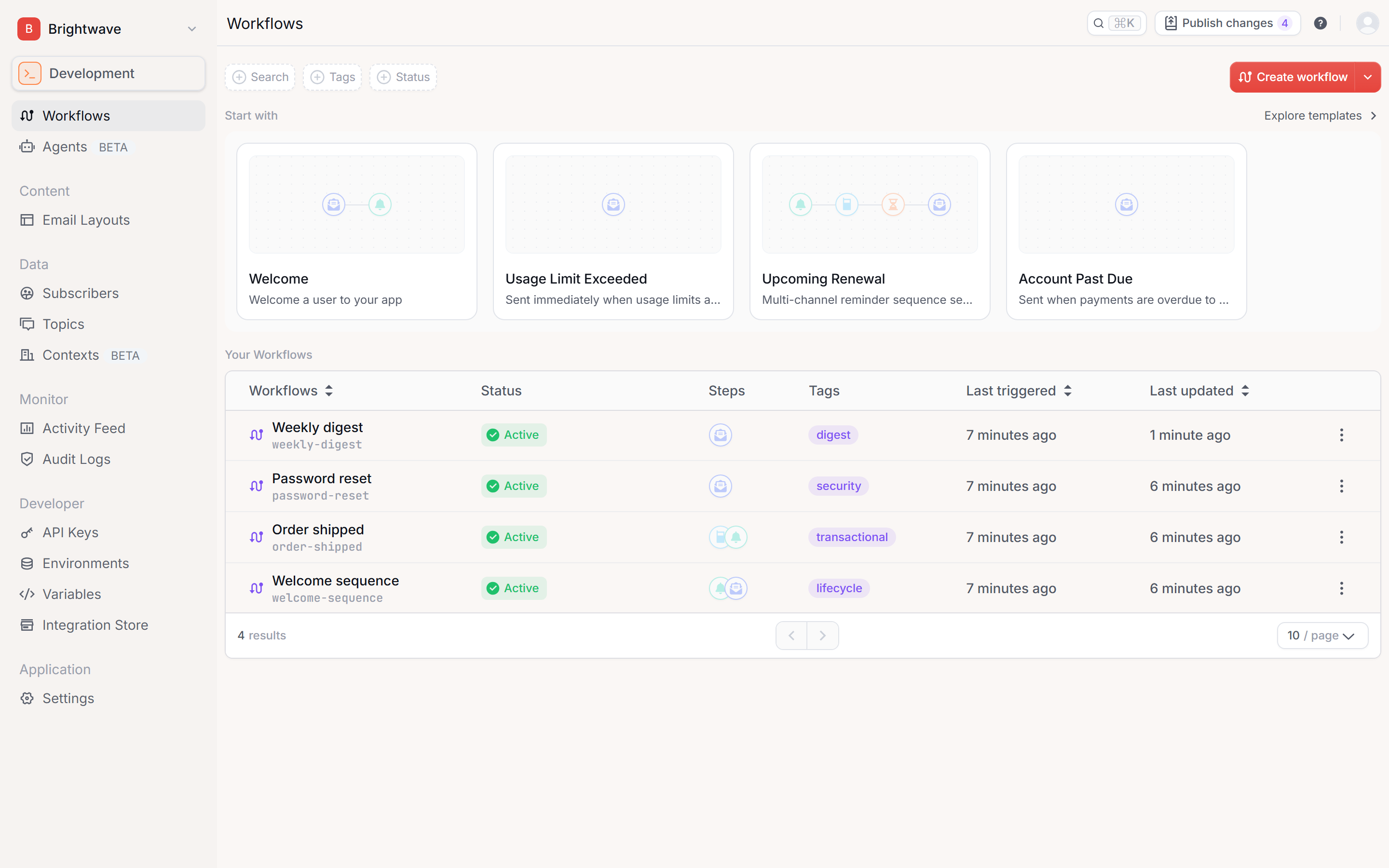
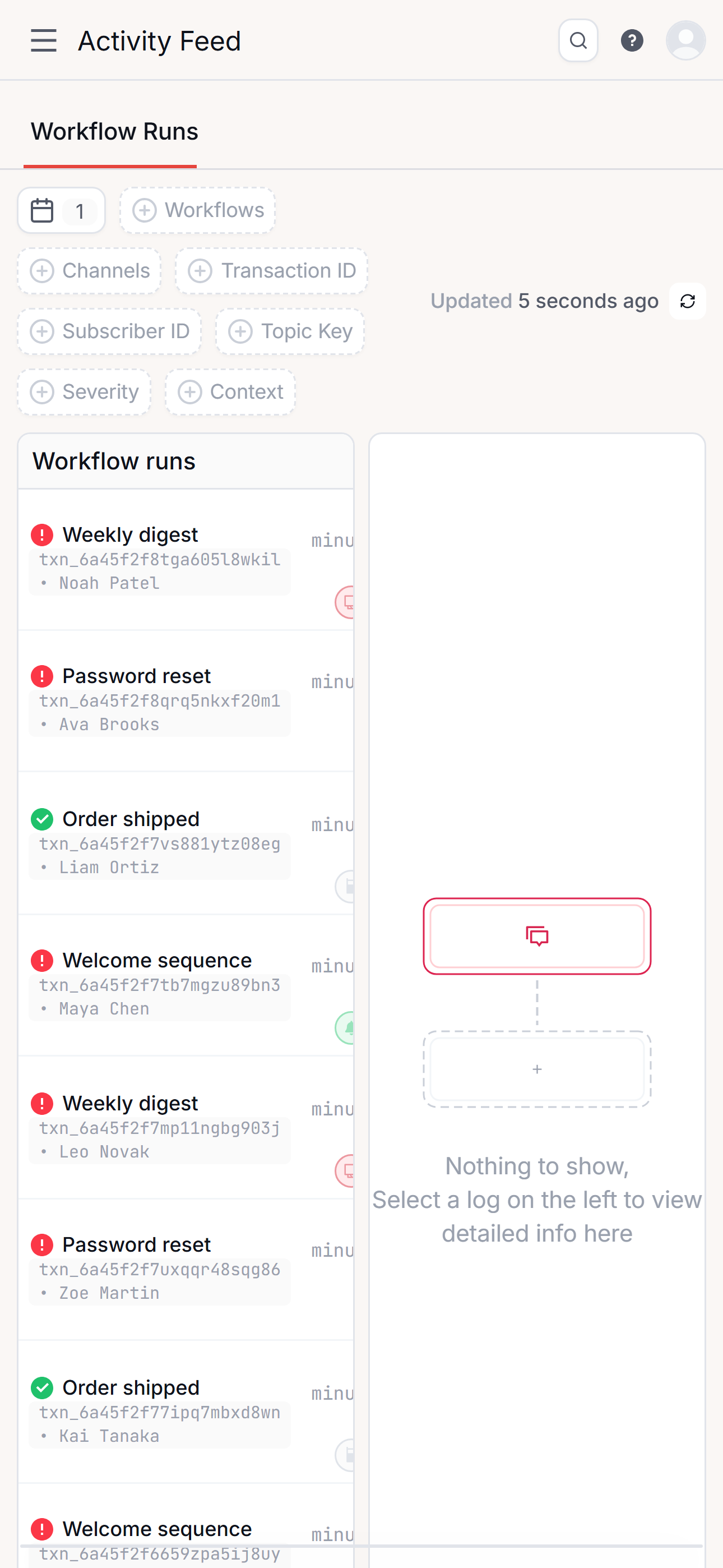
What it looks like installed.

The installed Notifly app showing the workflows list with templates and status
Workflows, in the installed desktop app
The installed Notifly app on a phone showing the activity feed
Activity feed, on a phone
AI clients

Or skip the app entirely.

Notifly runs a remote MCP server at api.notifly.io/mcp. Clients sign in with OAuth 2.1 — no key pasting — and get seven tools scoped to what your account can already do. It is published in the Model Context Protocol registry as io.notifly/notifly.

Claude Code

One command in your terminal. The browser opens for the OAuth sign-in.

bash — add to Claude Code
claude mcp add --transport http notifly https://api.notifly.io/mcp

Cursor

One click — the link hands Cursor the same endpoint and it writes its own configuration.

Add Notifly to Cursor

Claude (claude.ai)

Settings → Connectors → Add custom connector, paste https://api.notifly.io/mcp, then complete the OAuth sign-in Claude opens.

ChatGPT

Settings → Connectors → Create, paste the same https://api.notifly.io/mcp endpoint and sign in with OAuth. Connector support depends on your ChatGPT plan.

— FAQ

Installing Notifly, answered.

Is Notifly on Google Play?

Yes. “Notifly: Push Notifications” is published by Devino under the package io.notifly.app. It is the Notifly dashboard in a native Android shell, so it signs in to the same workspace you use on the web.

Is there a Notifly app for iPhone or iPad?

Not on the App Store yet. You can install it today from Safari — Share, then Add to Home Screen — which gives app.notifly.io its own standalone window and the Notifly icon. The web side of the native install is already published: app.notifly.io serves an apple-app-site-association file so universal links resolve to the app as soon as the listing goes live.

Is there a Mac app?

Not on the Mac App Store yet. A native AppKit shell for macOS exists, and in the meantime Chrome and Edge on macOS install app.notifly.io as a standalone windowed app straight from the address bar.

Is there a Windows or Microsoft Store version?

There is no Microsoft Store package, and that is deliberate rather than pending. On Windows, Linux and ChromeOS you install app.notifly.io from the browser in one click — it gets its own window, its own icon and its own taskbar entry, with no installer to download.

Do my users need the app to receive notifications?

No. Notifly is the platform you send notifications with, and the app is the Notifly dashboard — workflows, subscribers, and the delivery activity feed — in a window of its own. The people you notify receive email, SMS, push, in-app and chat messages through the providers you configure, with nothing of Notifly's installed.

Does the installed app work offline?

Partly, on purpose. The dashboard's service worker precaches an offline page and serves the app's content-hashed assets from cache, but it never caches API responses or signed-in pages — a stale authenticated response is a session-safety problem, not a speed-up. With no connection you get the offline page rather than stale data.

Can I use Notifly from Claude, ChatGPT or Cursor?

Yes. Notifly runs a remote MCP server at api.notifly.io/mcp. Clients sign in with OAuth 2.1 rather than a pasted API key, and it exposes seven tools: trigger_workflow, list_workflows, get_workflow, list_subscribers, get_subscriber, list_topics and list_notifications.

Does the app cost anything?

No. There is no separate app purchase and no in-app purchase — the app signs in to the workspace and plan you already have. What the free and paid plans include is on the pricing page.